
Turn your cover art into a living Canvas
Upload your artwork and get a seamless 3–8 second looping video that meets Spotify’s Canvas specs — 9:16, silent, and ready to drop into Spotify for Artists. The motion is generated from your own cover, so your release keeps its identity.
Seamless loop9:16 · up to 1080×1920Ready for Spotify for Artists
Drop your cover art here, or browse files
JPG, PNG or WebP · square covers welcome — we extend them to 9:16 automatically
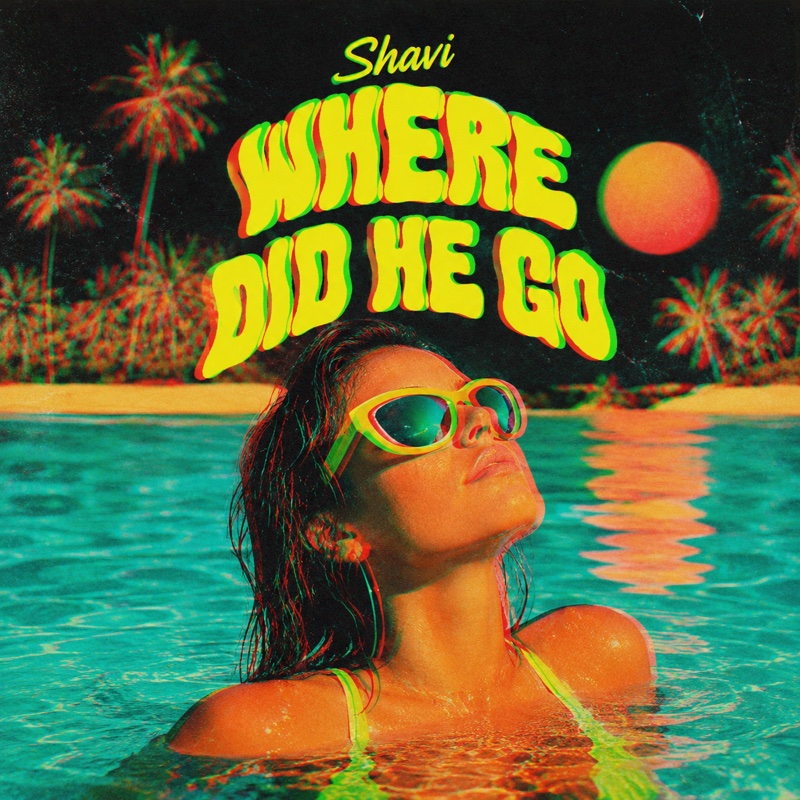
Your artwork comes alive with a subtle, seamless breathing motion — the same treatment as the example above. Nothing generic gets pasted on top.
Uploading your artwork…
Render + seamless loop — a couple of minutes. Keep this tab open.
Your recent Canvases
Re-open and download every Canvas you've rendered here. Results stay in your private library.
How it works
From still cover art to an accepted Canvas — every render leaves already matching Spotify’s spec.
Start with your artwork
Drop in the cover of your release — JPG, PNG or WebP. Just made it in the AI Album Cover Generator? One click sends it straight here, so the Canvas and the cover share one identity.
Square art becomes a full 9:16 stage
Your cover is recomposed into a full-bleed vertical scene — the world of your artwork grows naturally to fill the phone screen, your original stays untouched at the heart, and a vision check re-rolls any render with glitches or duplicated elements.
A subtle, truly seamless loop
The motion is rendered from your own image — light drifts through your scene, nothing generic is pasted on top — and the loop is mirrored so the last frame lands exactly on the first. No visible jump, no crossfade tricks.
Download — and upload without rejections
Every file is rendered to Spotify’s exact Canvas rules, so Spotify for Artists takes it first try: open your track, Add Canvas, upload the MP4. Done — your Now Playing screen moves.
Built to Spotify’s Canvas spec
Every render leaves this tool already matching what Spotify for Artists expects.
9:16 vertical
Full-screen portrait video — 720×1280 standard, 1080×1920 in HD. Both clear Spotify’s minimum of 720 px tall.
3–8 second loop
Choose a 5 or 8 second loop — every download is rendered to land safely inside Spotify’s accepted window, so uploads never get rejected.
MP4, silent
Canvas videos play muted in the app, so your file ships as clean, silent H.264 MP4.
Seamless repeat
The render is directed to end where it began, so the loop plays continuously without a visible jump.
One plan unlocks every AI Studio tool
A single subscription covers all 11 tools — mastering, lyrics, stems, instrumentals, chords, effects, stereo mixing, genre detection, trending edits, AI album covers and Spotify Canvas videos. You get one shared pool of minutes to spend however you like.
Free
Try the whole studio and ship the occasional track.
No card required
- 10 shared minutes / month
- All 11 AI Studio tools included
- Upload MP3 & WAV, up to 60 MB
- Tracks up to 8 min each
- MP3 320 downloads
- TXT & SRT lyric export
- WAV downloads — 24-bit & 16-bit
- Commercial-use license
Creator
For active artists shipping music regularly.
Billed monthly
- 30 shared minutes / month
- All 11 AI Studio tools included
- Upload all formats, up to 150 MB
- Tracks up to 15 min each
- WAV downloads — 24-bit & 16-bit
- All languages + forced language
- Commercial-use license
- Top-up minute packs anytime
Studio
For studios, labels and high-volume catalogues.
Billed monthly
- 90 shared minutes / month
- Everything in Creator
- All 11 AI Studio tools included
- Files up to 400 MB & 30 min
- Batch processing
- Highest-priority queue
- Priority support
Need more minutes?
Top-up packs add minutes on top of your plan and never expire while you're subscribed.
Prices in EUR. Minutes are shared across every AI Studio tool and billed by processing time (heavier tools use more). Cancel anytime from your billing portal.
Free online Spotify Canvas maker
A Spotify Canvas maker turns your static cover art into the short looping video that plays full-screen behind your track in the Spotify app. Canvas clips are 3–8 seconds long, vertical (9:16), and completely silent — and Spotify has said tracks with a Canvas tend to see more shares, saves and playlist adds than tracks without one. This tool generates that video for you in about a minute: upload your artwork and download a Spotify Canvas video that already matches the official specs.
Unlike template libraries that paste your cover into a generic animation, this Canvas video generator animates the artwork itself. The motion is rendered from your image — light moves across your scene, smoke curls through your colors — so the Canvas feels like a natural extension of the release, not a stock effect.
What is a Spotify Canvas?
Canvas is Spotify’s looping visual format: a short vertical video that replaces the static album art on a track’s Now Playing screen in the mobile app. It loops continuously while the song plays and appears in shares to Instagram Stories, making it one of the cheapest ways to make a release feel bigger. Canvas is uploaded per-track through Spotify for Artists, and you can change it at any time without re-releasing the song.
Spotify Canvas size, length and format requirements
- Aspect ratio: 9:16 vertical (portrait)
- Length: 3 to 8 seconds, played on loop
- Format: MP4 video or JPG image
- Resolution: at least 720 px tall — 1080×1920 recommended for the sharpest result
- Audio: none — Canvas always plays silent
- Content: keep it clean of heavy text and logos; Spotify may reject clips that look like ads
Every video from this Spotify Canvas generator is rendered to those requirements — an exact 9:16 MP4 at 720×1280 or 1080×1920, your choice of 5 or 8 seconds, silent, with no added text or watermarks — so you can upload the download straight to Spotify for Artists.
How to add a Canvas to your Spotify track
- Render and download your Canvas video above.
- Open Spotify for Artists (web or app) and go to Music → Songs.
- Pick the track, tap Add Canvas, and upload your MP4.
- Preview the loop and save — it usually goes live within minutes.
Why make your Canvas from the cover art?
Listeners connect a release to its artwork. When the Canvas is a living version of the same cover — the same scene breathing, drifting or catching light — the whole presence of the track stays coherent from playlist thumbnail to full-screen loop. That’s also why this tool deliberately refuses to add text, logos or unrelated stock motion: the best-performing Canvases are simple, atmospheric loops that deepen the artwork rather than distract from it.
Tips for a Canvas that loops beautifully
Start from the highest-resolution artwork you have (1080 px or larger) — clean, well-composed covers with a clear subject animate most beautifully. The subtle breathing treatment is deliberate: it is the motion that loops most invisibly and reads as premium rather than gimmicky on the Now Playing screen. Your upload is used only for rendering, and finished Canvases are saved to your private history so you can re-download them for every future release cycle.
Skip the work — get a finished track
Browse exclusive ghost-produced tracks ready to release, or commission a fully custom production from professional producers.
More tools in the AI Studio
Spotify Canvas maker FAQ
Canvas is Spotify's short looping video format: a 3–8 second vertical clip that plays full-screen behind your track in the mobile app, replacing the static cover art. You upload it per-track through Spotify for Artists and can swap it anytime.
9:16 vertical, 3–8 seconds, MP4 (or JPG for a still), at least 720 px tall — 1080×1920 recommended. Canvas always plays silent. Every video this tool renders already matches that spec.
You can render a Canvas free with the monthly processing minutes included on every account — no software to install. Paid plans and top-up packs add more renders per month plus HD 1080×1920 output.
Download your MP4, open Spotify for Artists, go to Music → Songs, choose the track and tap Add Canvas. Upload the file, preview the loop and save — it usually appears in the app within minutes.
Yes. Every render is finished so its last frame flows straight back into its first — the loop repeats without a visible jump or fade. The subtle breathing motion is designed specifically to loop invisibly.
Spotify has reported that tracks with a Canvas tend to get more shares, saves and playlist adds than tracks without one. It's one of the few visual upgrades on Spotify you fully control, and you can add one to every track in your catalog.
By design — Spotify plays every Canvas muted while your actual track provides the audio. Shipping a silent file is part of the spec.
No. Square and landscape artwork is extended onto a full 9:16 stage first: the original stays pixel-perfect in the center while the background continues naturally above and below. Then the motion is rendered on the full vertical frame.
Your upload is used only to render your video and is removed from our working storage afterwards. Finished Canvases are saved to your own private results history so you can download them again anytime, and you can delete them whenever you like.
Lyric videos and visualizers made from your track, posts published on autopilot to Instagram and TikTok, 34,000+ labels, playlists, radio, YouTube channels and blogs pitched for you, every store, your numbers in one place. Free plan included.