
Key takeaways
- Expensive monitors help, but references and translation checks matter more.
- Leave headroom and stop making mix decisions through heavy limiting.
- EQ should solve named problems, not rescue weak arrangement choices.
- Compression controls timing, groove, and density before it controls loudness.
- Width works when the center is strong and the low end stays mono-compatible.
- Master bus processing should confirm a balance, not hide a broken mix.
Professional mixing is not a plugin chain, and that belief is the first thing worth killing. Bedroom producers waste months hunting for the engineer preset, the magic bus compressor, or the expensive monitor pair that will suddenly make a track sound like a label release. It will not. professional mixing is a repeatable decision process: level, balance, tone, dynamics, space, translation.
The uncomfortable part is that most “advanced” mix advice skips the dull checks that separate finished records from loud demos. A CDJ-3000 does not care which saturation plugin you used. A small club PA will expose a 90 Hz pile-up in ten seconds. Spotify normalization will not rescue a crushed chorus. The working alternative is stricter and less glamorous: calibrated references, boring gain staging, ruthless arrangement edits, and mix moves you can defend with numbers.
Belief: Professional Mixing Starts With Expensive Monitors
The expensive monitor belief is incomplete. Better speakers help, but they do not create judgment. A producer on Genelec 8351Bs can still overcook 60 Hz if the room has a 12 dB standing wave. A producer on decent headphones can make smart calls if references, level, and cross-checks are locked.
The working alternative is translation testing. professional mixing starts by learning what your setup lies about. Most untreated bedrooms exaggerate 120 to 250 Hz and understate sub below 45 Hz. That is not opinion. It is basic room physics: small rectangular rooms stack modal problems exactly where kick and bass fight.
Build a reference loop before touching EQ
Pick three released tracks in the same lane as your record. If you produce tech house, do not reference a cinematic pop ballad. Use a clean club track from a trusted label, a denser track with vocals, and one record that has the low end you actually want.
Drop them into Ableton Live, Logic, or FL Studio. Turn them down until the loudest section sits roughly at the same perceived level as your mix. If your rough mix is peaking at -6 dBFS, pull the references down, not your confidence up.
The professional mixing reference loop
The professional mixing habit is simple: compare for ten seconds, act for thirty seconds, compare again. Long listening sessions trick the ear. Short checks expose obvious problems faster.
Use Youlean Loudness Meter or FabFilter Pro-L 2 only as a meter here, not as a loudness target. If the reference has more weight at 80 Hz and your mix has more fog at 220 Hz, that is a mix decision, not a mastering problem.
- Set your monitoring volume to a repeatable level, around 73 to 78 dB SPL for small rooms.
- Check the mix once on headphones, once on monitors, once very quiet.
- Use a spectrum analyzer for confirmation, not as a steering wheel.
- Export a 24-bit WAV and test it in the car or on small Bluetooth speakers.
- If every playback system says the vocal is low, the vocal is low.
Belief: Louder Rough Mixes Mean Better Decisions
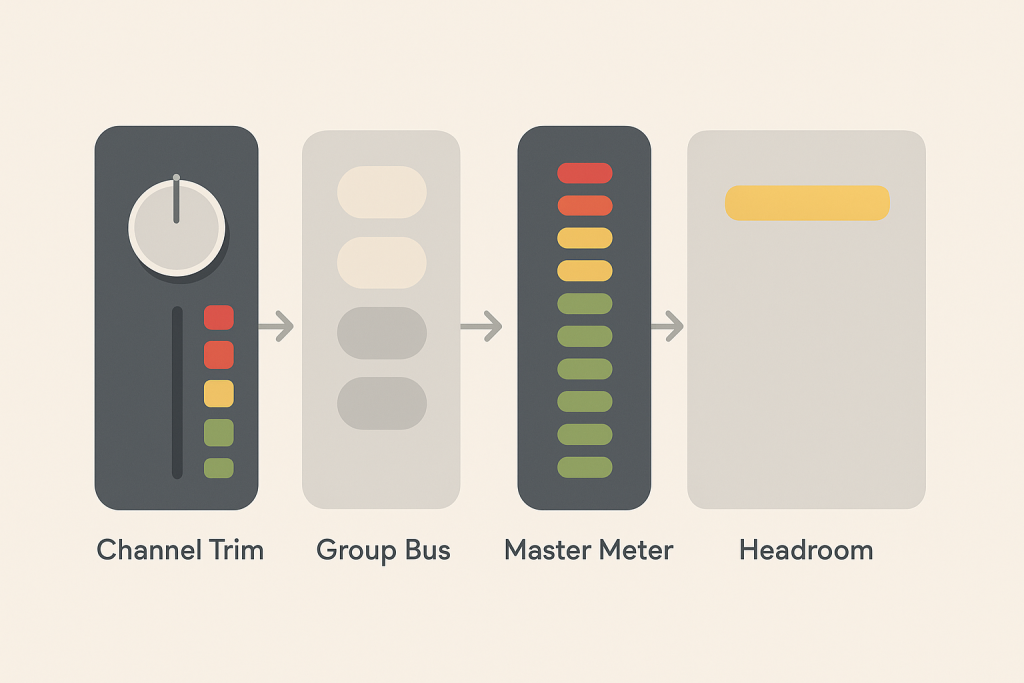
The loud rough mix belief is wrong because loudness hides imbalance. Push a limiter into 5 dB of gain reduction and the kick suddenly feels “finished,” until you remove the limiter and hear the bass smearing the entire groove. professional mixing needs headroom because headroom keeps decisions honest.
A clean session should usually peak around -6 dBFS on the stereo bus before mastering. That number is not sacred, but it prevents clipped internal prints, overloaded analog-style plugins, and false excitement from a red master channel.
Gain staging is not old-engineer nostalgia
Many analog-modeled plugins expect levels around -18 dBFS RMS, the rough digital equivalent of 0 VU. Hit them 12 dB hotter and they may distort, compress, or smear transients before you wanted character. Sometimes that is useful. Most of the time it is accidental.
On a kick channel, trim the sample before the compressor. If the raw kick peaks at -1 dBFS, pull it down 8 to 10 dB. Then set the channel fader for balance. The fader is not a repair tool for a clipped source.
Stop mixing through a panic limiter
A safety limiter catching 1 dB on the rough bus is fine. Mixing into a limiter taking 6 dB from the first hour is a trap. It changes envelope decisions, especially on kick, snare, bass, and lead vocal.
If you want energy while writing, use a temporary loudness chain. Label it “demo loud,” turn it off before final balance work, then bring it back only to check how the mix reacts. professional mixing separates excitement from diagnosis.
- Leave the master bus peaking around -6 dBFS before final limiting.
- Trim hot samples before compression or saturation.
- Avoid clipping individual channels unless the distortion is intentional.
- Bypass the loudness chain every 15 minutes.
- Match reference loudness before judging tone.

Belief: EQ Fixes Every Bad Sound
The EQ belief is seductive because EQ feels precise. FabFilter Pro-Q 4 can show the mess in bright colors, but it cannot turn a weak sample choice into a strong production decision. professional mixing uses EQ after arrangement and sound selection, not instead of them.
If two synth layers fight from 300 Hz to 1.5 kHz, the best move may be muting one of them. That is not laziness. It is engineering. A mix with fewer overlapping parts usually sounds bigger than a crowded mix with twenty surgical cuts.
Cut problems you can name
“Remove mud” is too vague. Name the problem. If the bass masks the kick fundamental, identify both notes. A kick tuned around 55 Hz and a bass note holding 55 Hz need arrangement or sidechain help, not just a random low shelf.
Useful starting points: high-pass non-bass percussion around 120 Hz, cut boxy synth build-up near 220 to 350 Hz, dip harsh vocal or lead resonances around 2.5 to 4.5 kHz, and check brittle hats around 8 to 12 kHz. Move slowly. A 2 dB cut often beats a 7 dB rescue attempt.
Use dynamic EQ when the problem moves
Static EQ is clumsy on sounds that only misbehave on certain notes. A bass may boom on G but sit perfectly on A. Pro-Q 4 dynamic bands, TDR Nova, or Soothe2 can pull only the hot moments down.
Set a dynamic band at the offender frequency, use a narrow Q if it is a resonance, and aim for 1 to 3 dB of gain reduction. If you need 8 dB constantly, the sound or part is wrong. professional mixing does not mean saving every bad layer.
- Mute before you EQ when two parts do the same job.
- Use high-pass filters gently, especially on vocals and synths with body.
- Sweep quietly, not at painful monitor volume.
- Prefer narrow cuts for resonances and broad moves for tone.
- Check EQ decisions in mono before committing.
Belief: Compression Is Just About Making Tracks Louder
The compression belief misses the point. Compression is timing control. It shapes how a sound enters, holds, and leaves the groove. professional mixing uses compressors to create movement, not just meter gain.
A compressor with a 1 ms attack can shave the transient off a snare and make it feel smaller. The same compressor with a 20 ms attack can let the crack through and control the tail. That one setting changes the groove more than another boutique plugin ever will.
Attack and release decide groove
For drums, start slower than you think. On a drum bus, try 10 to 30 ms attack, auto or 100 ms release, 2:1 ratio, and 1 to 2 dB of gain reduction. If the groove starts breathing with the tempo, keep going. If it flattens, back off.
On bass, compression often needs a faster attack to even out notes. Try 3 to 10 ms attack and 80 to 150 ms release. Watch the release return before the next note. If it never recovers, the compressor is pinning the part down.
Parallel compression beats crushing the main channel
Parallel compression keeps transients while adding density. Send drums to a return channel, smash that return with an 1176-style plugin at a high ratio, then blend it under the dry kit. On Ableton Push 3 or a mouse-and-keyboard session, the move is the same: the blend is the sound.
For dance records, parallel drum compression often works better than heavy master compression because it adds body without making the kick pump the whole track. That is professional mixing discipline: pressure where it helps, not everywhere.
- Use slower attack when you want more punch.
- Use faster attack when peaks are too spiky.
- Time release to the song, not the plugin preset.
- Blend parallel compression under the dry signal.
- Level-match bypassed and active compression before judging.
- If compression makes the part smaller, remove it.

Belief: A Wide Mix Needs Stereo Enhancers
The stereo enhancer belief ruins more bedroom mixes than it saves. Width without mono control collapses on club systems, phones, and some festival playback rigs. professional mixing treats width as contrast: solid center, selective sides, and no essential low end living only in stereo.
Most club low end behaves better in mono below about 100 to 130 Hz. That is why many engineers use mid/side EQ to keep sub and kick centered while letting pads, percussion, and effects spread wider.
Make the center boring and strong
Kick, sub bass, lead vocal, snare or clap, and the main hook usually need a stable center. If those elements wander, the track feels smaller even when the sides are busy.
Use a utility plugin to check mono. In Ableton, the Utility device can collapse width instantly. In Logic, use Gain set to mono. If the drop loses the bassline or the vocal dips hard, you have a phase problem, not a vibe problem.
The professional mixing width test
The professional mixing width test is brutal: mute the sides. With a mid/side EQ or analyzer, listen to the mid channel alone. The song should still make musical sense. Then listen to the sides alone. They should add size, movement, and ear candy, not carry the entire record.
For a wide pad, high-pass the side signal around 150 Hz. For stereo percussion, cut harsh side fizz around 9 kHz if it makes the top end feel cheap. Width should feel expensive because it is controlled.
- Keep kick and sub centered below roughly 120 Hz.
- Check mono before printing a final bounce.
- Use stereo widening on supporting parts, not the whole mix.
- Pan arrangement layers before reaching for an imager.
- Use mid/side EQ to clean low-frequency side buildup.

Belief: Professional Mixing Happens on the Master Bus
The master bus belief is the final myth. A master chain can polish a strong balance, but it cannot rebuild a weak one. professional mixing happens mostly on individual channels and groups before the stereo bus sees anything dramatic.
If a mix only feels exciting with Ozone, Pro-L 2, a clipper, and a saturator all working hard, the track is not finished. It is being held together by pressure. Pull the chain off and the truth comes out fast.
Bus processing should confirm, not rescue
A sensible dance mix bus might use light glue compression, a tiny broad EQ move, and a ceiling-free limiter for checking. For example: SSL-style bus compressor, 2:1 ratio, 30 ms attack, auto release, 1 dB of gain reduction. That is glue. Four dB is a new arrangement decision wearing a compressor costume.
Use clipping carefully. Soft clipping a drum bus by 1 to 2 dB can add density before the limiter. Clipping the full mix because the drop is not hitting usually means the kick, bass, or lead is wrong.
Print stems like someone else may finish the record
Artists using custom music production or ghost production services should care about stems. Clean stems tell you whether the production is organized or just loud. Print drums, bass, music, vocals, FX, and any key sidechain trigger separately.
Leave tails. Name files clearly. Keep the same start point. If the vocal stem clips at +0.3 dBFS and the FX stem starts on bar 9, nobody is impressed. professional mixing is partly about making the next person’s job unambiguous.
- Fix kick and bass balance before adding mix bus limiting.
- Keep bus compression around 1 to 2 dB unless the effect is obvious and wanted.
- Print an unmastered mix with at least -6 dBFS peak headroom.
- Export organized stems from bar 1 or the same timecode.
- Reference the unmastered bounce before judging the mastered loud version.
- Use the master chain as a check, not a crutch.
| Move | Best Use | Typical Setting | Bad Sign |
|---|---|---|---|
| Gain staging | Restoring headroom and honest plugin behavior | Tracks trimmed so mix bus peaks near -6 dBFS | Everything sounds worse when the limiter is bypassed |
| Dynamic EQ | Controlling note-based resonances | 1 to 3 dB reduction on harsh or boomy moments | The band is reducing constantly like a static cut |
| Parallel compression | Adding drum density without killing transients | Heavy compression blended quietly under dry drums | The groove pumps out of time |
| Mid/side EQ | Cleaning width and mono translation | Low side cut around 100 to 150 Hz | The drop loses power in mono |
Further reading
- Ableton Live manual — Official documentation for Ableton devices, routing, meters, and Utility mono checks.
- Sound On Sound mixing — Long-running professional audio publication with engineer-led mixing techniques and studio education.
Frequently asked questions
What is professional mixing in music production?
professional mixing is the process of balancing levels, tone, dynamics, space, and stereo position so a track translates across playback systems. It is not just making the track loud. The goal is a controlled unmastered mix with clear priorities, enough headroom, and no hidden problems that mastering has to fight.
Can I mix professionally on headphones?
Yes, if you know the headphones and cross-check your work. Use references, keep volume moderate, and test on speakers when possible. Headphones can exaggerate stereo width and hide room problems, but they also reveal clicks, noise, edits, and reverb tails very clearly.
How much headroom should I leave before mastering?
A safe target is a stereo mix peaking around -6 dBFS with no limiter forcing loudness. The exact number matters less than avoiding clipping and over-compression. If your mix has clean transients, balanced low end, and no clipped channels, the mastering stage has room to work.
Why does my mix sound good in headphones but bad in the car?
Cars expose low-mid buildup, vocal balance problems, and over-wide effects. Headphones remove the room from the equation, so bass and stereo decisions can feel cleaner than they are. Use level-matched reference tracks and check 100 to 300 Hz carefully before blaming mastering.
Should I mix into a limiter?
A light safety limiter for checking loudness is fine, but heavy limiting while mixing can hide weak balances. If the limiter is taking 4 to 6 dB all session, you are reacting to distortion and density instead of the actual mix. Bypass it often.
What plugins do I need for a clean mix?
You need fewer than most ads suggest: a reliable EQ, compressor, saturation tool, reverb, delay, meter, and limiter for checking. FabFilter Pro-Q 4, TDR Nova, Ableton stock devices, Logic stock plugins, and Valhalla reverbs can all deliver release-ready results when used with restraint.
Conclusion
professional mixing is less mystical than the internet makes it. The hard part is accepting that the boring moves usually win: trim the sources, compare against real records, cut only what you can name, time compression to the groove, check mono, and keep the master bus honest. None of that requires a flagship studio or a rack of rare hardware.
The contrarian truth is that a mix starts sounding expensive when the decisions get smaller and more deliberate. Try this in your next session: remove the loudness chain, level-match one reference, and fix only the first problem you can clearly hear. Then print the bounce and test it away from the DAW.
Professional mixing — Quick Recap
The fastest way to lock in professional mixing is to internalise the workflow above and repeat it on every project. Start small: pick one technique from this professional mixing guide, apply it to your next session, and audit the result against a reference track.
- Expensive monitors help, but references and translation checks matter more.
- Leave headroom and stop making mix decisions through heavy limiting.
- EQ should solve named problems, not rescue weak arrangement choices.
- Compression controls timing, groove, and density before it controls loudness.
Treat professional mixing as a habit, not a one-off — the producers who consistently nail professional mixing are the ones who run the same checks on every track. That’s the difference between a clean, club-ready master and a track that sounds great at home but falls apart on a real system.
In a real studio session, professional mixing comes down to the order in which you make decisions: reference first, gain stage second, then the creative work. Producers who treat professional mixing as a checklist instead of a vibe end up shipping more tracks.
Most producers and DJs undervalue professional mixing because the wins are invisible until the track plays back on a real system. Bake professional mixing into your template and the next ten projects benefit automatically.
My Career makes videos from your own track and posts them for you, pitches your release to 34,000+ labels, playlists, radio stations, YouTube channels and blogs, puts it in every store and briefs you every morning. Free plan, no card, two minutes to set up.


