Key takeaways
- Treat ai vocals like raw stems, not finished magic.
- Fix timing and phrase shape before chasing tone.
- A 30-minute chain can work if the source melody is already strong.
- Sidechained delay and filtered reverb keep club hooks readable.
- Save licence notes and avoid recognisable voice imitation.
- Use synthetic hooks as maps when a real singer will cut the final.
The phrase ai vocals came up three times before lunch last Tuesday, once from a DJ needing a topline for a tech house promo, once from an artist who hated their demo voice, and once from me while staring at a chorus that sounded almost right but not quite alive.
I kept the notebook open for that whole stretch. Ableton Live 12 on the main machine, FabFilter Pro-Q 4 and Soothe2 on repeat, a Pioneer DDJ-FLX10 plugged in beside the desk so I could check transitions without pretending the studio was a club. The useful bit was not making synthetic singing sound human. That is the wrong fight. The useful bit was making ai vocals behave like a finished stem, with timing, breath space, tone, and a lane in the mix.
Ai vocals behaved better when I treated them like stems
The first mistake I kept hearing was respect. Too much of it. Someone prints ai vocals, drops the file on bar one, and leaves every wobble in place because the take feels expensive or fragile. I did the opposite. I treated it like a vocal comp from a tired singer at 1 a.m.
That meant cutting hard. Eight bars became four. The hook lost two syllables. One note that smeared over the snare got muted, not fixed. The result felt more like a record and less like a demo auditioning for permission.
Where ai vocals fooled me first
The polished top end was the trap. On small speakers the take sounded finished, but on the Genelec 8030s the phrase endings had a papery fizz around 8 kHz. Soothe2 caught some of it, but only after I stopped asking it to do surgery.
I set Soothe2 to a narrow-ish upper-mid focus, eased the depth until the lisp stopped jumping out, then used Pro-Q 4 for one static cut around 3.2 kHz. That beat stacking five clever processors and wondering why the chorus went grey.
My rough stem pass
I kept the first pass boring: trim silence, fade breaths, clip-gain loud syllables by 1 to 3 dB, then print a clean version before any creative chain. If ai vocals start messy, the compressor tells on them. Every time.
- Leave about -6 dB headroom before the vocal bus.
- Cut dead air before downbeats so the groove breathes.
- Check the hook in 4-bar phrases, not line by line.
- Mute words that fight the kick instead of forcing EQ to save them.
- Print a raw edit before creative processing.
- Clip-gain harsh syllables before compression.
- Keep fades short, usually 3 to 12 ms.
- Judge the hook against drums, not solo.
- Remove one weak word before adding another plug-in.
The uncanny bit was timing, not tone
I had one chorus that sounded smooth enough to fool a phone speaker, then fell apart once the drums arrived. The singer was not late in a normal human way. The consonants landed too evenly, like everything had been quantised by someone who had never watched a crowd move.
For club music, that is fatal. A kick at 126 BPM gives you no hiding place. ai vocals need pocket work before they need gloss.
I moved consonants, not whole lines
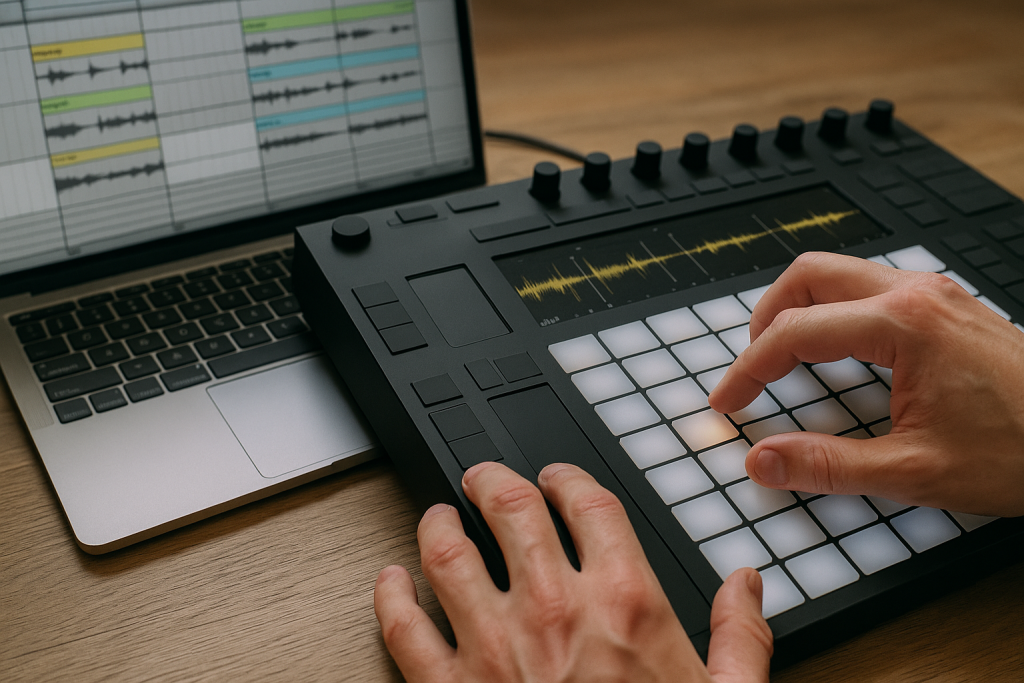
Warping the whole phrase made it worse. In Live 12, I placed warp markers on consonants, usually T, K, P and the first hard S, then nudged those into the drum pocket by tiny amounts. Ten milliseconds can be the difference between locked and nervous.
I have not tested the same routine on Logic 11 yet, but Flex Time should handle the same job if you resist the urge to grid everything. The line needs a shoulder. Too perfect reads fake.
A small delay made the voice less plastic
One trick held up across three sessions: a quiet slap delay before the main reverb. I used EchoBoy at around 85 ms, low-passed near 4.5 kHz, tucked almost too low to notice. It gave ai vocals a surface to lean on.
Then I sent the vocal to Valhalla VintageVerb, plate mode, 1.2 seconds, with a 180 Hz high-pass on the return. Long halls sounded impressive solo and useless in the drop.
- Nudge consonants against the snare and clap.
- Keep one or two imperfect phrase endings.
- Use slap delay before reaching for huge reverb.
- Low-pass delay returns so they do not hiss.
- Check timing on headphones and monitors.

The 30-minute chain I kept returning to
I timed this because I was curious, then because a client was waiting. Thirty minutes was enough if the source had a decent melody and lyrics that did not read like placeholder text. It was not enough for a broken topline. No chain fixes a bad idea.
The chain below is the version that survived the week. I used it on two house sketches, one darker melodic techno idea, and a pop-leaning demo for an artist who wanted the final cut replaced by a live singer later.
The chain, written exactly as I used it
First came Pro-Q 4, high-pass at 90 Hz, a small cut at 220 Hz if the voice clouded the bass, and a dynamic dip around 3 to 5 kHz only when the words spat. Then Pro-C 2, 3:1 ratio, medium attack, fast-ish release, taking 2 to 4 dB on peaks.
After that, Soothe2 did the brittle work. Fresh Air or Saturn 2 came next only if the chorus needed lift. Last was Pro-L 2 catching half a dB, not smashing. ai vocals collapse when the limiter becomes the personality.
The routing mattered more than the plug-in order
I sent the vocal to three returns: short room, plate, and a quarter-note delay sidechained from the dry vocal. The sidechain ducking kept the words clear, then let the delay bloom in the gaps. Basic. Reliable.
On the vocal bus, I used mid/side EQ gently. A small side lift above 10 kHz helped width, but I kept the actual lyric mostly centre. Wide lead vocals feel expensive until the mono check deletes the hook.
- Dry lead in the centre.
- Wider doubles lower than you think.
- Delay return ducked 2 to 5 dB.
- Reverb return filtered below 180 Hz and above 9 kHz.
- 0 to 5 minutes: edit and fade.
- 5 to 12 minutes: EQ and clip gain.
- 12 to 20 minutes: compression and resonance control.
- 20 to 26 minutes: delay, room and plate sends.
- 26 to 30 minutes: mono check and reference pass.

Reference tracks saved me from shiny nonsense
I had one late-night pass where the hook sounded huge on its own. I bounced it, walked away, came back after tea, and realised it had nothing to do with the record. The vocal was a billboard pasted onto a club track.
Since then I have been dragging in two references before I touch the chain. Not ten. Two. One for vocal level, one for space. With ai vocals, references keep the ear honest because the source can flatter you early.
The meter was useful, but the fader told the truth
Youlean Loudness Meter showed me the vocal was not wildly out of range, but the fader still came down 1.5 dB after I checked against a released tech house track. Meters do not understand attitude. They show energy, not confidence.
I used ADPTR MetricAB for level-matched checks and kept switching at the busiest part of the arrangement, usually the second drop. If ai vocals survived that section without poking out or vanishing, the rest was usually manageable.
A DJ check exposed the ugly bits
The DDJ-FLX10 stayed plugged in for a reason. I loaded the bounce into Rekordbox and mixed it after a finished record, then into another. That told me more than another hour of soloing ever would.
On one version, the vocal reverb washed over the incoming hi-hats during a 16-bar blend. Back in Live, I shortened the plate decay from 1.8 to 1.1 seconds and cut the return at 7.5 kHz. The mix stopped smearing.
- Use one reference for level and one for space.
- Level-match before judging brightness.
- Test the second drop, not the intro.
- Blend the bounce on DJ gear if the track is for clubs.
- Fix reverb tails that fight incoming hats.

The legal and ethical notes stayed on the desk
I am not a lawyer, but I do keep session notes clean because messy rights kill releases. The practical rule in our room was simple: know where the vocal source came from, save the licence, and do not imitate a living artist’s recognisable voice. That line is not blurry to me.
For artists using ghost production or custom music production, ai vocals can be useful as a writing tool, a guide vocal, or a finished texture if the rights are clear. They are not a shortcut around consent.
I wrote down source, licence and intent
Every session got a note: tool used, date printed, licence link, prompt or lyric source, and whether the final record would keep the vocal or replace it. It felt dull until a label asked where a hook came from. Then it felt like oxygen.
If a client sent a synthetic voice that sounded suspiciously close to a known singer, I pushed back. Not politely vague. I would rather rebuild the hook than spend a release cycle waiting for a takedown email.
Guide vocal or final vocal
There is a real trade-off here. I like ai vocals for fast arrangement decisions. They show whether the chorus earns its space before anyone books a singer. For final releases, I trust them when the voice is clearly licensed, the character is original, and the processing supports the song instead of hiding the source.
In custom work, that distinction matters. A guide vocal can be rough, flexible and temporary. A final vocal needs paperwork, edit discipline and a mix that does not fall apart under club pressure.
- Save the licence beside the project file.
- Avoid cloning recognisable artists.
- Mark guide vocals clearly in the session.
- Keep lyric ownership notes with the bounce.
- Tell collaborators what is synthetic before delivery.

What I would send to a singer tomorrow
After all that, the most useful bounce was not always the final vocal. Sometimes it was the map. ai vocals gave the singer phrasing, melody shape and emotional target without me mumbling into a phone at midnight.
When I sent a guide, I printed three things: dry vocal, processed vocal, and instrumental with the vocal tucked in. The dry file showed the melody. The processed version showed the colour. The full bounce showed where the lyric had to sit when the kick came back.
The handover folder was plain
I named files like a boring adult: 126bpm_Amin_hook_dry.wav, 126bpm_Amin_hook_wet.wav, 126bpm_Amin_instrumental.wav. No mystery versions. No final_final_02. A singer, writer or ghost producer should not need detective skills to open a folder.
I also printed a MIDI melody and a one-page note with the words, tempo, key, and where I wanted loose timing. That last part mattered. If the singer copied the synthetic timing exactly, the hook lost its body.
The final check was emotional, not technical
Once the mix passed the boring tests, I stopped staring at analysers. I played the hook from the hallway, then on AirPods, then quietly through one Avantone MixCube. If I still believed the chorus at low volume, it stayed.
That is the line I keep coming back to with ai vocals. The tools can make a clean file. The producer still has to decide whether anyone would sing the line back after the lights come up.
- Print dry, wet and full-context bounces.
- Include BPM, key and lyric notes.
- Export MIDI for melody reference.
- Mark timing spots that should stay loose.
- Check the chorus quietly before signing off.
| Job | Tool or Technique | Setting I Reached For | Why It Stayed |
|---|---|---|---|
| Harsh upper mids | Soothe2 plus Pro-Q 4 | Dynamic control around 3 to 5 kHz | Reduced fizz without making the hook dull |
| Club clarity | Sidechain ducking on delay | 2 to 5 dB duck from dry vocal | Kept words forward while delays filled gaps |
| Pocket repair | Ableton Live 12 warp markers | Tiny consonant nudges, often under 15 ms | Fixed groove without grid-locking the phrase |
| Width | Mid/side EQ | Small side lift above 10 kHz | Added air while keeping the lyric centred |
| DJ reality check | Pioneer DDJ-FLX10 and Rekordbox | 16-bar blend into released tracks | Exposed reverb tails and vocal level problems |
Further reading
- Ableton Live manual — Ableton's official documentation explains warping and audio timing tools used for vocal pocket edits.
- Sound On Sound vocals — Sound On Sound is a long-running professional recording publication with practical vocal processing guidance.
Frequently asked questions
Are ai vocals legal to use in a released track?
They can be legal if the source, licence and usage rights are clear. Save the licence, avoid imitating a recognisable artist without consent, and keep notes on where the vocal came from. If a label or distributor asks, you want paperwork, not memory.
Can synthetic vocals replace a real singer?
Sometimes, but I would not treat them as a blanket replacement. They work well for guide hooks, dance textures and certain polished toplines. A strong singer still brings timing choices, breath, accent and emotional accidents that are hard to fake convincingly.
What is the fastest way to make a synthetic vocal sit in a mix?
Edit first. Trim silence, clip-gain loud syllables, fade breaths and fix timing before adding plug-ins. Then use EQ, light compression, resonance control and filtered sends. Most bad vocal chains are trying to process around edits that should have happened earlier.
Should I tune synthetic vocals again?
Only if the melody drifts against the track. Heavy tuning can make an already synthetic source feel stiff. I prefer small pitch corrections, then timing edits and formant checks. If the vowel shape sounds wrong, tuning harder usually makes it worse.
Do synthetic vocals work for ghost production demos?
Yes, especially when the goal is to prove arrangement, topline shape or chorus energy before recording a final singer. For delivery, label the vocal clearly as guide or final, include rights information, and print dry plus wet stems for flexibility.
Which DAW is best for editing synthetic vocals?
Ableton Live is fast for warp-marker timing edits, which is why I used it here. Logic and FL Studio can do the job too. The DAW matters less than disciplined editing, clean gain staging and checking the vocal inside the full arrangement.
Conclusion
The best result I got from ai vocals was not a perfect imitation of a singer. It was a clean, usable hook that told the track where to go. The boring work mattered most: edits, clip gain, consonant timing, filtered sends, and reference checks against records that already work on a floor.
If you are producing from a bedroom setup, start with the 30-minute pass above and stop before the chain gets crowded. Print a version, mix it into another track, and listen for the first thing that annoys you. Fix that one thing. Try it in your next session, especially before you book a vocalist or hand a demo to a collaborator.
Ai vocals — Quick Recap
The fastest way to lock in ai vocals is to internalise the workflow above and repeat it on every project. Start small: pick one technique from this ai vocals guide, apply it to your next session, and audit the result against a reference track.
- Treat ai vocals like raw stems, not finished magic.
- Fix timing and phrase shape before chasing tone.
- A 30-minute chain can work if the source melody is already strong.
- Sidechained delay and filtered reverb keep club hooks readable.
Treat ai vocals as a habit, not a one-off — the producers who consistently nail ai vocals are the ones who run the same checks on every track. That’s the difference between a clean, club-ready master and a track that sounds great at home but falls apart on a real system.
In a real studio session, ai vocals comes down to the order in which you make decisions: reference first, gain stage second, then the creative work. Producers who treat ai vocals as a checklist instead of a vibe end up shipping more tracks.
Most producers and DJs undervalue ai vocals because the wins are invisible until the track plays back on a real system. Bake ai vocals into your template and the next ten projects benefit automatically.
When you struggle with ai vocals, the fix is rarely a new plugin. Loop a problem section, A/B against a reference, and isolate which element is breaking your ai vocals.
My Career makes videos from your own track and posts them for you, pitches your release to 34,000+ labels, playlists, radio stations, YouTube channels and blogs, puts it in every store and briefs you every morning. Free plan, no card, two minutes to set up.