
Key takeaways
- Good ableton mixing starts with headroom and group balance, not a crowded master chain.
- Utility, EQ Eight and Ableton Compressor can solve more problems than most plugin folders.
- Use Pro-Q 4 and Soothe2 for specific fixes, not as automatic polish.
- Sidechain release time should follow the groove, especially in kick and bass heavy records.
- Shared return effects keep space coherent and easier to control.
- Reference tracks work best when loudness is matched and the goal is perspective.
Ableton mixing nearly wrecked a 124 BPM tech-house record for me at 1:40 a.m. in a rented writing room above a small club in Leeds. The kick sounded huge on my Beyerdynamic DT 770s, the bass felt expensive, and the vocal chop had that smug little bounce producers love after midnight. Then I played the rough bounce through a battered Pioneer DJM-900NXS2 in the booth downstairs. Disaster. The low end folded, the clap vanished, and Soothe2 was shaving the life off the hook.
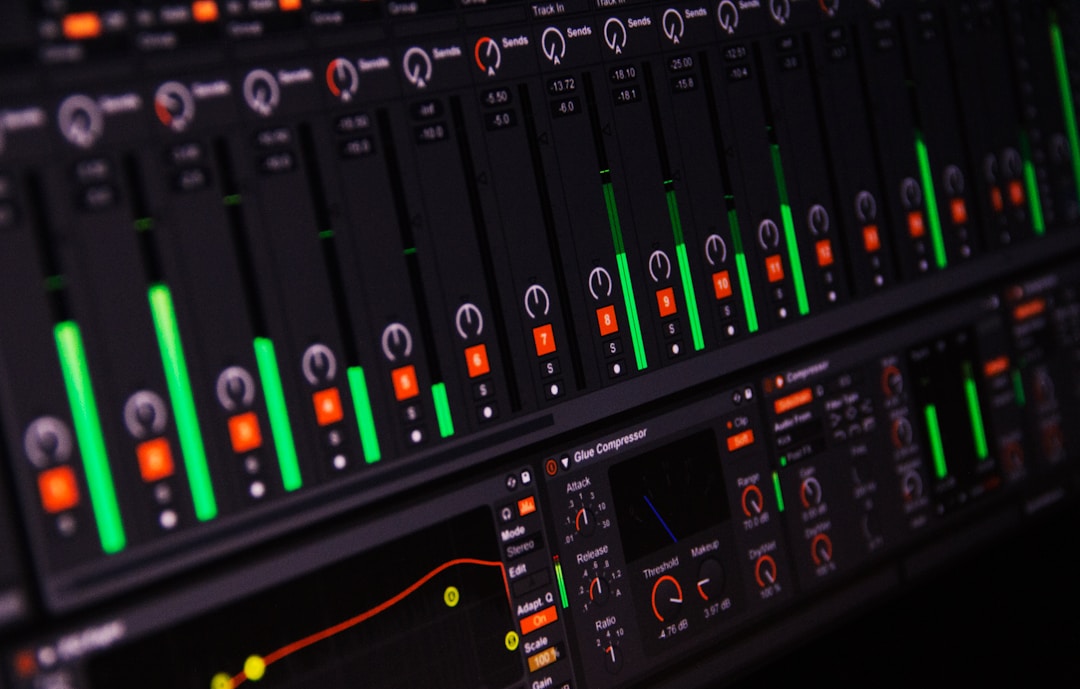
That night fixed my ableton mixing routine more than any clean tutorial ever did. I stopped treating Live as a sketchpad and started treating it like a console: Utility first, EQ Eight where it earns the slot, FabFilter Pro-Q 4 when surgery matters, Glue Compressor only when the groove asks for glue. The tools below are the ones I still trust when a record has to leave the room sounding finished.
Ableton mixing Tools That Saved the Session
The rescue started with a boring move. I pulled every group fader down until the master peak sat around -6 dB. No limiter. No heroic master chain. Just space. The room got quieter, but the record got easier to read.
That is the part nobody wants to post on Instagram. ableton mixing is usually won before the clever plugins arrive. If the kick group, bass group and music bus are already fighting at the input, Pro-Q 4 becomes a bandage, not a decision.
Utility Is the First Plugin I Reach For
Ableton Utility looks too plain to impress anyone, which is why I like it. On that Leeds session, Utility went first on every group. Drums at -3 dB, bass at -5 dB, music at -6 dB, vocals trimmed until the hook sat forward without leaning on compression.
I also use Utility for mono checks. Bass below 120 Hz needs discipline. If the sub gets wide, club translation gets weird fast, especially on systems where the low end is summed somewhere in the chain.
The Core ableton mixing Chain
My default chain is not flashy: Utility, EQ Eight or Pro-Q 4, compressor if needed, saturation if the source feels too polite, then a final Utility for level matching. That last Utility matters. Louder fools you.
- Utility: trim gain, mono check, width control.
- EQ Eight: broad cuts, quick filters, low cleanup.
- FabFilter Pro-Q 4: dynamic EQ, mid/side work, narrow fixes.
- Glue Compressor: drum bus movement, not punishment.
- Soothe2: harsh vocals and synth stacks, used lightly.
- Leave roughly -6 dB peak headroom before the mix bus.
- Put Utility first when imported stems arrive too hot.
- Level-match every plugin move before deciding it sounds better.
- Check mono before widening pads or bass effects.
- Keep the master clean until the balance works.

Gain Staging Before the Pretty Plugins
The first pass on that track was embarrassing because I had mixed into excitement instead of headroom. The kick sample was peaking near 0 dB, the bass rack was adding 4 dB through Saturator, and the drum bus had Glue Compressor reacting like it had been slapped.
ableton mixing gets calmer when the session behaves electrically. Live gives you enough meter information to do it properly, but you have to stop staring at the waveform and start listening to level relationships.
I Set the Kick, Then Stop Touching It
For dance music, I usually park the kick around -10 to -8 dB peak on its own channel. Not as a law. As a starting point that keeps me from building a mix around a clipped drum sample.
Once the kick feels right against the reference, I leave it alone for a while. Constantly nudging the kick makes every other choice unstable. Bring the bass, clap, percussion and music to it instead.
Groups Tell the Truth Faster
I group early: drums, bass, music, vocals, FX. On a custom production session with 70 tracks, that saves the day. Five group faders show whether the record is balanced. Seventy individual channels invite panic.
On the Leeds mix, the music group was 5 dB too loud. Not the lead synth. Not the piano stab. The whole music bus. One fader move fixed more than 20 minutes of pointless EQ.
- Start with the loudest musical anchor, usually kick or vocal.
- Keep individual tracks out of red meters before group processing.
- Use Clip Gain for obvious sample-level problems.
- Trim groups before adding bus compression.
- Turn monitoring down when balances start feeling aggressive.

EQ Decisions With EQ Eight and FabFilter Pro-Q 4
The muddy part of that mix was not a mystery once I stopped guessing. A rolling bass note, a tom layer and a warm pad were all living around 180 to 260 Hz. Together they made the drop feel like someone had thrown a blanket over the club rig.
This is where ableton mixing inside Live feels fast. EQ Eight handles the obvious work without slowing the session down. Pro-Q 4 comes out when I need dynamic bands, mid/side EQ, or a narrow cut that I want to hear moving only when the problem appears.
Ableton mixing EQ Moves That Actually Translate
I cut the pad around 220 Hz by 3 dB with a medium Q, then used Pro-Q 4 dynamically on the bass at 190 Hz so the note only dipped when it bloomed. The tom layer got a high-pass at 80 Hz. Nothing dramatic. The drop suddenly breathed.
That is the difference between fixing a frequency and sanding the record flat. A static cut works when the problem is constant. A dynamic cut works when the problem appears on certain notes or phrases.
Mid Side EQ Is Not Decoration
I use mid/side EQ when the center needs authority and the edges need polish. On wide pads, I often high-pass the sides around 150 Hz. On vocal delays, I may cut the mid around 2 kHz so the dry vocal keeps its place.
Bad width sounds impressive alone and weak in the mix. Good width leaves the kick, bass, snare and lead vocal standing in the middle like they paid rent.
- Cut the source causing the buildup, not every channel nearby.
- Use dynamic EQ when only certain notes get heavy.
- High-pass side information before widening low pads.
- Sweep quietly, not at stupid monitoring levels.
- Bypass often so the fix does not become the new problem.

Compression, Sidechain and the Groove Test
After the EQ cleanup, the drop still felt lazy. The kick and bass were no longer masking each other, but they were not dancing together either. That is when sidechain ducking did the job that EQ could not.
ableton mixing for club records lives or dies in the space between kick hits. A bass can be technically clean and still feel late. A compressor can show 3 dB of gain reduction and still miss the groove completely.
Ableton Compressor Still Works
I like Ableton Compressor for sidechain because it is quick and honest. On that track, I keyed the bass from the kick, set a fast attack, release around 95 ms, ratio at 4:1, and watched for about 3 to 5 dB of ducking.
The release was the whole feel. At 50 ms it chattered. At 160 ms the bass sagged. Around 95 ms, the bass came back before the offbeat hat, and the record started walking properly.
Glue Compressor Belongs on Buses, Not Everything
Glue Compressor is lovely when it moves a drum bus by 1 or 2 dB. It is ugly when it eats transients because the threshold got dragged down during a loud listening pass.
For drums, I start slow attack, auto release, ratio 2:1, then blend with the dry signal if needed. Parallel compression is usually better than crushing the main drum bus and pretending the punch survived.
- Set sidechain release to the groove, not the meter.
- Use 3 to 5 dB ducking for obvious club low-end separation.
- Keep drum bus compression around 1 to 2 dB unless you want an effect.
- Parallel compression keeps transients alive.
- If the track stops moving, remove compressors before adding more.

Space, Returns and the Reverb Trap
The vocal chop in the original bounce had a huge reverb tail from Valhalla VintageVerb. Soloed, it sounded expensive. In the drop, it smeared the clap and made the lead synth feel smaller. Classic bedroom trap: beautiful reverb, ugly record.
ableton mixing gets easier when ambience lives on return tracks. One short room, one plate or hall, one delay. That is enough for most dance tracks. More returns can work, but only if each one has a job.
Returns Keep the Record Coherent
I set a short room around 0.6 seconds for drums, a plate around 1.4 seconds for the vocal chop, and Ableton Echo on a dotted eighth delay. Then I EQ the returns like real channels.
The plate got a high-pass at 250 Hz and a low-pass around 8 kHz. The delay got sidechained gently from the dry vocal, so repeats stepped back while the chop played and returned in the gaps.
Freeze the Tail Before It Lies to You
Long tails make producers generous. I will print or freeze a reverb return, then look at where the tail lands across a 4-bar phrase. If it covers the next hook answer, it is not vibe. It is clutter.
On the Leeds track, muting one reverb send made the chorus feel wider. That sounds backward until you remember that contrast creates size. Empty space is part of ableton mixing, not a lack of effort.
- Use return tracks for shared room tone and cleaner decisions.
- High-pass reverbs higher than feels comfortable at first.
- Sidechain delays when the dry vocal or lead needs priority.
- Print long effects to check phrase timing.
- Mute sends often to find hidden smear.

References, Translation and the Final Print
At 2:25 a.m., after the low end behaved and the vocal sat right, I bounced the track and took it back downstairs. Same DJM-900NXS2. Same tired booth monitors. This time the kick held together, the clap cut through, and the hook did not spit at me.
That final check changed how I finish ableton mixing sessions. I reference sooner. I print versions. I listen outside the sweet spot. A mix that only works in the chair is not finished.
I Reference for Balance, Not Copying
I use ADPTR MetricAB or a simple audio track in Live with two references pulled down to match loudness. For tech house, one might be a clean Toolroom-style record and another a rougher underground cut with less shiny top end.
The point is not to clone the tonal curve. The point is to stop lying to yourself. If your bass is 4 dB louder than both references, maybe you made a choice. More often, you lost perspective.
The Print Pass Is Part of the Mix
Before printing, I automate the last details: a 1 dB lift on the pre-drop snare fill, a filter opening over 8 bars, a delay throw at the end of the second vocal phrase. Small moves make a record feel arranged instead of looped.
I leave mastering headroom, usually peaks around -6 dB and no limiter on the master unless it is clearly labelled as a rough-loudness chain. For artists handing files to a mix engineer, mastering engineer or ghost producer, clean prints and labelled stems save hours.
- Reference at matched loudness, not louder-is-better levels.
- Check the bounce on headphones, small speakers and a car if possible.
- Print an instrumental and acapella when vocals are involved.
- Label rough limiters so nobody masters through them by accident.
- Export stems from bar 1 so they line up cleanly.
| Tool | Best Use | My Starting Move | Watch Out For |
|---|---|---|---|
| Ableton Utility | Gain staging and width control | Trim groups until the master peaks near -6 dB | Widening bass below 120 Hz |
| EQ Eight | Fast cleanup and broad filters | High-pass non-bass parts only as needed | Thin mixes from automatic high-pass habits |
| FabFilter Pro-Q 4 | Dynamic EQ and mid/side fixes | Dynamic cut at 180 to 260 Hz on blooming bass | Over-surgical cuts that remove tone |
| Ableton Compressor | Sidechain ducking | Kick key, 4:1 ratio, release near 95 ms | Release times that fight the groove |
| Glue Compressor | Drum and music bus movement | 1 to 2 dB gain reduction at 2:1 | Flattened transients |
| Soothe2 | Harsh vocal chops and bright synth layers | Light depth, bypassed often | Removing emotion along with harshness |
| Valhalla VintageVerb | Shared plates and halls | High-pass return at 250 Hz | Long tails masking the next phrase |
| Youlean Loudness Meter | Final loudness checks | Measure rough bounce after the mix works | Mixing to numbers instead of balance |
Further reading
- Ableton mixing manual — Ableton's official manual is the primary source for Live mixer, routing and signal-flow behaviour.
- Sound On Sound mixing — Sound On Sound is a long-running professional audio publication with detailed engineering tutorials.
Frequently asked questions
What is the best ableton mixing chain for beginners?
Start with Utility for gain, EQ Eight for cleanup, Ableton Compressor for control, then a return reverb or delay. Keep the master clean while balancing. Add Pro-Q 4, Soothe2 or saturation only when the stock tools cannot solve a specific problem.
Can you mix a full song using only Ableton stock plugins?
Yes. Utility, EQ Eight, Compressor, Glue Compressor, Saturator, Echo and Hybrid Reverb can finish a serious record. Third-party plugins are useful for speed and detail, but they do not replace balance, headroom, automation and reference listening.
How much headroom should I leave before mastering in Ableton?
A safe target is around -6 dB peak on the master with no clipping. The exact number is less important than clean dynamics and no hidden limiter. If you send stems, export from bar 1 and leave processing clearly labelled.
Should I put a limiter on the master while mixing?
I avoid mixing through a limiter unless it is only for a rough loud bounce. Limiters hide balance problems, especially kick and vocal levels. If you use one for client playback, disable it before exporting premaster files or stems.
Why does my mix sound good in headphones but weak in the car?
Headphones can exaggerate width and hide low-end translation issues. Check mono, control sub width below 120 Hz, and compare against references at matched loudness. Car systems expose kick-bass balance problems quickly because the cabin boosts certain low frequencies.
Is Pro-Q 4 better than EQ Eight for Ableton mixes?
Pro-Q 4 is better for dynamic EQ, mid/side precision and fast visual work. EQ Eight is still excellent for broad cuts and simple filters. I use EQ Eight first when the move is obvious, then Pro-Q 4 when the fix needs detail.
Conclusion
The Leeds track shipped two days later, and the fix was not some secret rack. It was a calmer ableton mixing routine: gain first, EQ with intent, compression for movement, effects on returns, then references before printing. That order still saves me when a session feels messy.
Try it in your next session before reaching for another plugin. Pull the groups down, make the kick and bass agree, mute one reverb send, and print a rough bounce without a limiter. Then listen somewhere uncomfortable. The weak spots will introduce themselves, and the next move will be obvious.
Ableton mixing — Quick Recap
The fastest way to lock in ableton mixing is to internalise the workflow above and repeat it on every project. Start small: pick one technique from this ableton mixing guide, apply it to your next session, and audit the result against a reference track.
- Good ableton mixing starts with headroom and group balance, not a crowded master chain.
- Utility, EQ Eight and Ableton Compressor can solve more problems than most plugin folders.
- Use Pro-Q 4 and Soothe2 for specific fixes, not as automatic polish.
- Sidechain release time should follow the groove, especially in kick and bass heavy records.
Treat ableton mixing as a habit, not a one-off — the producers who consistently nail ableton mixing are the ones who run the same checks on every track. That’s the difference between a clean, club-ready master and a track that sounds great at home but falls apart on a real system.
In a real studio session, ableton mixing comes down to the order in which you make decisions: reference first, gain stage second, then the creative work. Producers who treat ableton mixing as a checklist instead of a vibe end up shipping more tracks.
Most producers and DJs undervalue ableton mixing because the wins are invisible until the track plays back on a real system. Bake ableton mixing into your template and the next ten projects benefit automatically.
When you struggle with ableton mixing, the fix is rarely a new plugin. Loop a problem section, A/B against a reference, and isolate which element is breaking your ableton mixing.
Treat ableton mixing as a craft, not a chore. The producers releasing on the biggest labels lock ableton mixing in early so they can spend their energy on melody and arrangement instead of fighting the mix.
My Career makes videos from your own track and posts them for you, pitches your release to 34,000+ labels, playlists, radio stations, YouTube channels and blogs, puts it in every store and briefs you every morning. Free plan, no card, two minutes to set up.


